Private beta

Stop editing. Start directing.

The AI-native editor for talking-head video. Describe the outcome — the agent cuts, places b-roll, writes captions and scores it, on a real multitrack timeline you can still edit.

AWS AIdeas · Top 300 of 10,000 No card Rolling invites
Lumiere
Founder cut Agent Export 999.999 credits AU
Man With A Grey Shirt.mp4
00:00.00 / 00:27.06 Full
Search transcript, visuals, or momen
CCaptions
T3Titles
B2B-Roll
V1Video
M2Music
S3SFX
The run

One prompt, six steps,
one finished cut.

Not a mockup — a screen capture of a single agent run, start to finish.
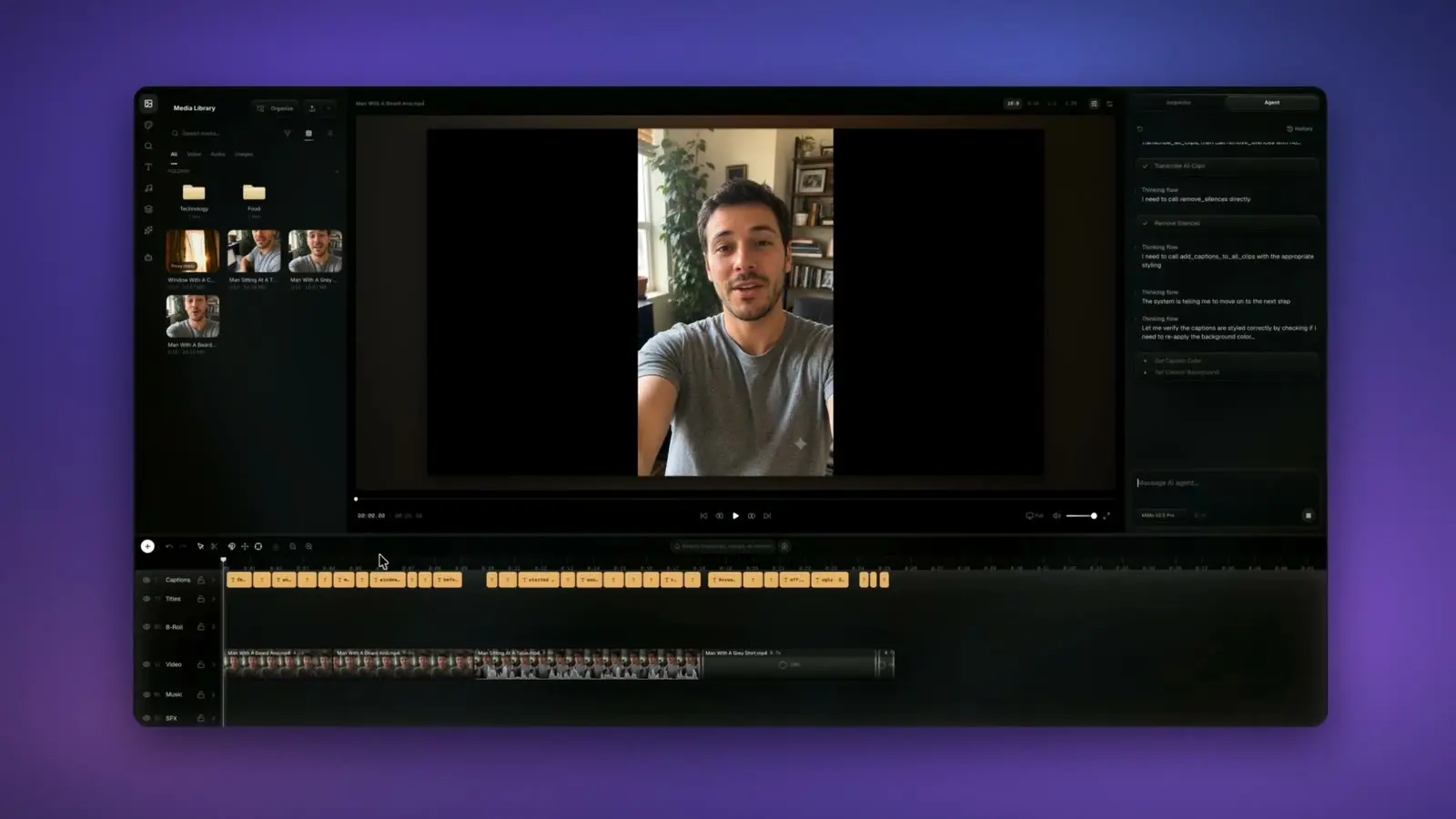
SourceScreen capture · one run
Runtime00:48 · time-compressed
StagingNone — unscripted
0:00 / 0:48
01 · The direction
Direct it Pick a direction below — the run jumps to it
The pass

Raw in.
Finished out.

One frame, both states. Drag the divider to the left and the mechanical pass appears — trimmed, captioned, graded, scored.

The pass 0/5 applied
Dead air trimmed −2.4s
Captions on the beat 21 lines
Orange & teal grade 3D LUT
B-roll on the line 3 clips
Whoosh on the transition 3 SFX
so we just ship it. Raw Lumiere
What the agent ships

The finishing pass,
without the handoff.

Captions

Captions that hit on the beat.

Auto-transcribed and word-synced, with karaoke highlight, clean wrapping, and your brand styling — every line landing exactly when it's spoken.

Word-level syncKaraokeBrand styles35 presets
Mostpeopleneverfinishtheedit.
B-roll & sound

The right shot over the right line.

The agent reads the transcript, watches your clips, and lays b-roll where the words earn it — then puts a transition at each in-point and a whoosh on top of it.


Transcript-matchedVision-taggedSFX bedsAuto transitions
“…the city never sleeps”
Delivery

Render in the tab. Ship everywhere.

WebCodecs renders locally — no upload, no render farm, no desktop install. Reframe once and export every aspect ratio your channels need.

4K60fpsMP4 / H.264Bitrate control
Silence & filler removal Motion graphics from a prompt Log-aware color & 3D LUTs Music beds & beat matching Semantic search across footage
The control room

Your timeline. Your taste.
Your final call.

Never trained on.

Nothing you upload trains any model. The agent reads your project only to make the edits you ask for.

Rendered on your machine.

Exports run locally over WebCodecs — footage is never shipped off to a render farm.

Private by default.

Media lives in your own private storage bucket — never shared, never sold, deleted when you say so.

Reversible by design.

One undo reverts an entire agent turn. Nothing is flattened, nothing is locked.

Access

Start with a cut.
Scale when it earns it.

Plans open at launch. Move up only when Lumiere is already saving you more time than it costs.

StarterSolo entry
$9/month

For getting real edits done without the daily beta ceiling.

Monthly credit budget
600 AI credits
Rolls over up to 1,800 included credits.
  • 5 hours of transcription / month
  • Timeline editing, captions, transitions
  • Stock footage, music & GIF search
Available at launch
Most popular ProSolo creator budget
$19/month

For regular AI edits, captions, and assisted finishing with fewer beta limits.

Monthly credit budget
1,500 AI credits
Rolls over up to 4,500 included credits.
  • 25 hours of transcription / month
  • Priority queue + longer context
  • Advanced multi-step edits
Available at launch
MaxStudio headroom
$49/month

For heavier motion, deeper analysis, and larger multi-step edit sessions.

Monthly credit budget
4,000 AI credits
Rolls over up to 12,000 included credits.
  • 83 hours of transcription / month
  • 2× Deep Analysis frame sampling
  • Priority queue for larger edit sessions
Available at launch
FAQ

Questions,
answered.

Is that demo real?
Yes — it's an unscripted screen capture of one agent run inside Lumiere: the plan, the assembly, the captions, the b-roll, the sound effects, and the playback on a real six-track timeline. It's time-compressed so the whole run fits in 48 seconds; nothing in the timeline was staged or added afterwards.
What formats and codecs does Lumiere support?
Import: H.264 (MP4/MOV) and VP9/AV1 (WebM), up to 4K, 60fps — plus H.265 where your browser supports it. Audio: WAV, AAC, MP3. Export: MP4 (H.264; H.265 where supported), with bitrate control.
Do you train on my footage?
No. Your media stays in your own private cloud storage bucket, and nothing you upload is ever used to train any model. The agent only reads your project to make the edits you ask for.
Who's behind Lumiere?
One person. Lumiere is built solo by Ataberk Uygur — a working video editor who cuts client footage every week. It placed in the top 300 of 10,000 entries at AWS AIdeas, and beta feedback visibly shapes the roadmap.
What does the private beta include?
Rolling invites off the waitlist, free access with capped daily AI limits, the full timeline editor, captions, transitions, and the agent. No credit card, no lock-in — and a direct line to the founder.
Does it work offline?
The editor runs in your browser, but your media and the AI agent need a connection. Your project autosaves continuously, so a dropped connection won't lose your edits.
Private beta

Bring the footage.
Keep the point of view.

Lumiere takes the mechanical pass. You keep the final cut.

No cardRolling accessNo spam